> ## Documentation Index
> Fetch the complete documentation index at: https://docs.myrmex.ai/llms.txt
> Use this file to discover all available pages before exploring further.
# Apolo
> The network topology and discovery specialist — maps how your environment connects, keeps the telemetry graph current, and surfaces devices nobody is managing.
**Apolo** is the network specialist. While the other agents work with assets you've registered, Apolo works with the **shape of the network between them**: what talks to what, through which segments, and — the part that matters most — what is out there that you never onboarded.
## What Apolo Does
Builds the L2/L3 picture of your environment — interfaces, neighbour tables
and routes, collected from the targets that have the **Topology** module
switched on.
Maintains the network telemetry graph: which hosts share a gateway or VLAN,
which links are proven, which are inferred from a route, and which are
expiring.
Surfaces devices seen on the network but not enrolled in Myrmex — discovered
via ARP, with no agent reporting.
Answers reachability questions: what sits on the same segment as a
compromised host, and how far a problem could travel.
## The Topology view
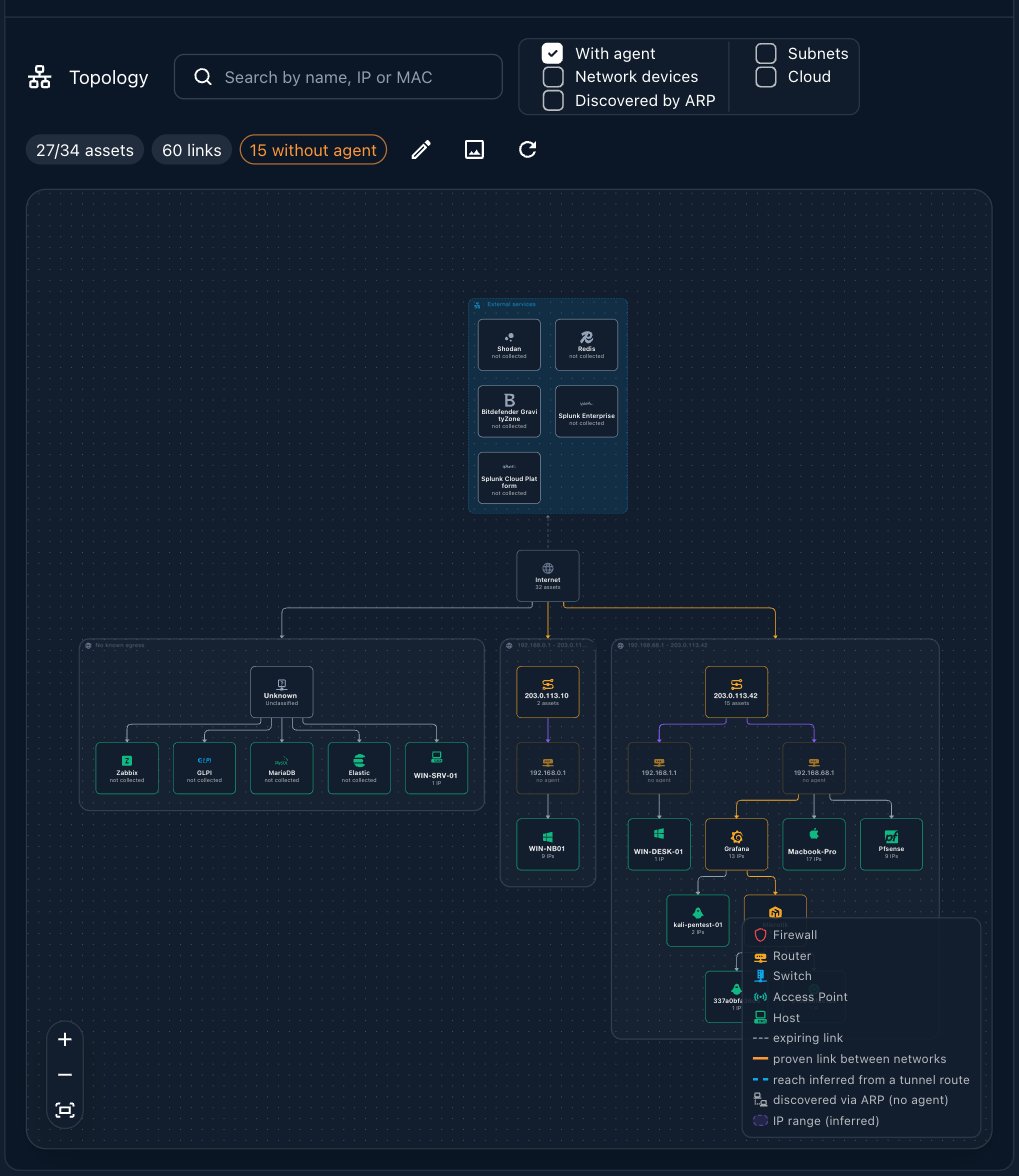
Apolo's work surfaces in the **Topology** quick action in the [Directory](/documentation/ai-workspace/overview#the-directory). The map counts how many assets it covers, how many links it has drawn, and how many devices it sees **without an agent** — the gap between what you manage and what is actually there.
Filter the map by what you want to see: hosts **with agent**, **network devices**, things **discovered by ARP**, **subnets**, or **cloud**. The legend distinguishes firewalls, routers, switches, access points and hosts, and marks each link as proven, inferred from a tunnel route, or discovered via ARP.
 A target only contributes to the map when its **Topology** module is on. You
switch it per target, next to the Audit module — see
[Frameworks & scanning](/documentation/security-posture/frameworks#enabling-auditing-on-a-target).
## How to Use Apolo
Ask in plain language, naming Apolo when you want the network view specifically:
* *"Apolo, which hosts share the same gateway or VLAN?"*
* *"What devices are on the network without a Myrmex agent?"*
* *"If this host were compromised, what else sits on its segment?"*
## Apolo vs. Brontes
Both know about your devices, from opposite directions:
* **Brontes** knows what you have **registered** — the assets you onboarded, their state and their configuration.
* **Apolo** knows what is **reachable** — the segments, the paths between them, and the machines nobody registered.
The gap between the two lists is usually the interesting part.
## Where to Go Next
The platform and asset administrator.
The specialist that acts on a host once you've found it.
A target only contributes to the map when its **Topology** module is on. You
switch it per target, next to the Audit module — see
[Frameworks & scanning](/documentation/security-posture/frameworks#enabling-auditing-on-a-target).
## How to Use Apolo
Ask in plain language, naming Apolo when you want the network view specifically:
* *"Apolo, which hosts share the same gateway or VLAN?"*
* *"What devices are on the network without a Myrmex agent?"*
* *"If this host were compromised, what else sits on its segment?"*
## Apolo vs. Brontes
Both know about your devices, from opposite directions:
* **Brontes** knows what you have **registered** — the assets you onboarded, their state and their configuration.
* **Apolo** knows what is **reachable** — the segments, the paths between them, and the machines nobody registered.
The gap between the two lists is usually the interesting part.
## Where to Go Next
The platform and asset administrator.
The specialist that acts on a host once you've found it.