> ## Documentation Index
> Fetch the complete documentation index at: https://docs.myrmex.ai/llms.txt
> Use this file to discover all available pages before exploring further.
# Identity & Access Management
> Manage who can access what, where, and under which conditions with RBAC roles, permissions, asset groups, and security policies.
import {
CardGroup,
Card,
Steps,
Step,
Note,
Warning,
Accordion,
AccordionGroup,
Tabs,
Tab,
} from "@mintlify/components";
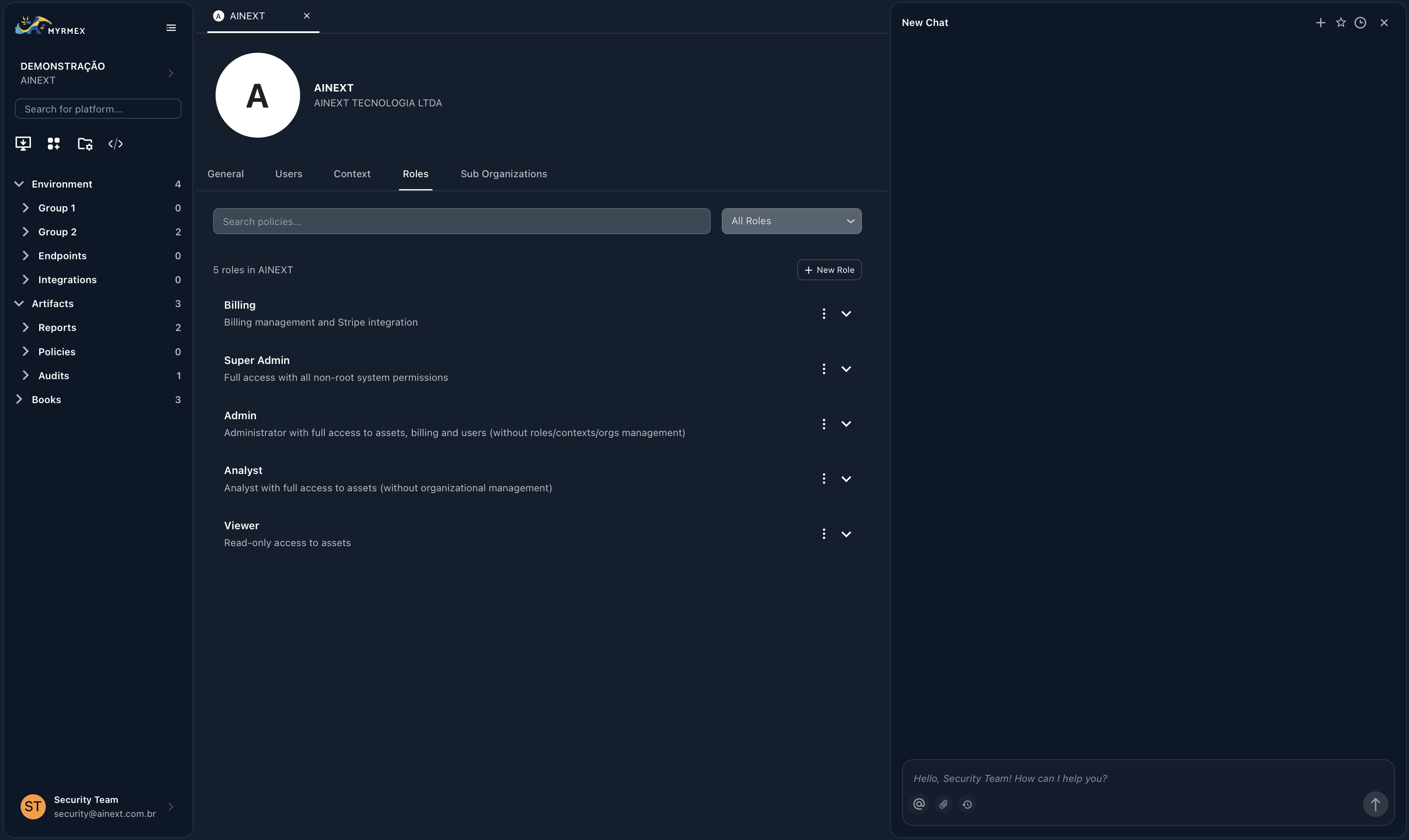
Myrmex provides a comprehensive **Identity & Access Management (IAM)** system that combines two complementary layers to give you granular, flexible control over your security infrastructure:
* **RBAC (Role-Based Access Control):** Defines *who* can do *what* and *where* — through roles, permissions, and asset groups.
* **ABAC (Attribute-Based Access Control):** Adds *contextual conditions* — time of day, source IP, MFA status, device type — through security policies.
 ***
## Two Layers of Access Control
```mermaid theme={null}
graph TD
U[User Request] --> RBAC[RBAC Layer]
RBAC -->|Has Permission?| CHECK{Permission Check}
CHECK -->|No| DENY1[❌ Access Denied]
CHECK -->|Yes| ABAC[ABAC Layer]
ABAC -->|Conditions Met?| RESULT{Policy Evaluation}
RESULT -->|Pass| ALLOW[✅ Access Granted]
RESULT -->|Fail| DENY2[❌ Blocked by Policy]
style RBAC fill:#3b82f6,color:#fff
style ABAC fill:#8b5cf6,color:#fff
style ALLOW fill:#10b981,color:#fff
style DENY1 fill:#ef4444,color:#fff
style DENY2 fill:#ef4444,color:#fff
```
Roles grant permissions (e.g., `devices.read`) scoped to specific organizations and contexts via Asset Groups. This is the **base layer** — without the right permission, access is always denied.
Security Policies add environmental conditions on top of RBAC. For example: *"Deny device access outside business hours"* or *"Require MFA for integration management."*
**How they work together:** RBAC is evaluated first. If a user has the required permission, ABAC policies are then checked. Both layers must pass for access to be granted.
***
## RBAC: Roles, Permissions & Asset Groups
To effectively manage access in Myrmex, it's important to understand the relationship between these three core components:
**Job Functions.** A role is a collection of permissions that represents a job function (e.g., "SOC Analyst", "Network Admin"). Users are assigned to roles.
**Granular Capabilities.** A permission is a specific action on a resource (e.g., `devices.read`, `integrations.execute`). Roles contain permissions.
**Scope Boundaries.** While permissions define *what* you can do, Asset Groups define *where* you can do it — across organizations and contexts.
### How RBAC Works
Myrmex calculates effective access by combining all assigned roles and their respective scopes:
```mermaid theme={null}
graph LR
U[User] --> R1[Role: Analyst]
U --> R2[Role: EMEA Team]
R1 --> P[Permissions: devices.read, reports.generate]
R2 --> S[Scope: EMEA Contexts Only]
P & S --> EA[Effective Access: View & Report on EMEA Devices]
```
* **Additive Permissions:** Combine roles to grant additional capabilities.
* **Cross-Functional Teams:** Support users who work across multiple specialties or regions.
* **Temporary Access:** Easily grant and revoke additional access by adding/removing roles.
***
## ABAC: Security Policies
Security Policies allow you to enforce conditions beyond simple role assignments. They operate on top of RBAC permissions to restrict or allow access based on environmental attributes.
Understand policy effects (deny/allow), targeting, priority, and how conditions are evaluated.
Explore all condition types: source IP, time of day, day of week, MFA status, device type, and user agent.
### Common Use Cases
| Scenario | Policy Effect | Condition |
| ---------------------------------------- | ------------- | --------------------------------------------------- |
| Block access outside business hours | Deny | `time_of_day` not between 08:00–18:00 |
| Require MFA for admin actions | Deny | `mfa_status` equals false |
| Allow access only from corporate network | Deny | `source_ip` not in 10.0.0.0/8 |
| Restrict Viewer role to weekdays only | Deny | `day_of_week` not in Mon–Fri, targeting Viewer role |
Step-by-step guide to creating, editing, and organizing security policies in the Myrmex interface.
***
## Next Steps
Learn about the five pre-configured roles available for every organization.
A complete list of the 81 granular permissions available in Myrmex.
Understand how to control resource access via organizations and contexts.
Add conditional access rules with ABAC security policies.
***
## Two Layers of Access Control
```mermaid theme={null}
graph TD
U[User Request] --> RBAC[RBAC Layer]
RBAC -->|Has Permission?| CHECK{Permission Check}
CHECK -->|No| DENY1[❌ Access Denied]
CHECK -->|Yes| ABAC[ABAC Layer]
ABAC -->|Conditions Met?| RESULT{Policy Evaluation}
RESULT -->|Pass| ALLOW[✅ Access Granted]
RESULT -->|Fail| DENY2[❌ Blocked by Policy]
style RBAC fill:#3b82f6,color:#fff
style ABAC fill:#8b5cf6,color:#fff
style ALLOW fill:#10b981,color:#fff
style DENY1 fill:#ef4444,color:#fff
style DENY2 fill:#ef4444,color:#fff
```
Roles grant permissions (e.g., `devices.read`) scoped to specific organizations and contexts via Asset Groups. This is the **base layer** — without the right permission, access is always denied.
Security Policies add environmental conditions on top of RBAC. For example: *"Deny device access outside business hours"* or *"Require MFA for integration management."*
**How they work together:** RBAC is evaluated first. If a user has the required permission, ABAC policies are then checked. Both layers must pass for access to be granted.
***
## RBAC: Roles, Permissions & Asset Groups
To effectively manage access in Myrmex, it's important to understand the relationship between these three core components:
**Job Functions.** A role is a collection of permissions that represents a job function (e.g., "SOC Analyst", "Network Admin"). Users are assigned to roles.
**Granular Capabilities.** A permission is a specific action on a resource (e.g., `devices.read`, `integrations.execute`). Roles contain permissions.
**Scope Boundaries.** While permissions define *what* you can do, Asset Groups define *where* you can do it — across organizations and contexts.
### How RBAC Works
Myrmex calculates effective access by combining all assigned roles and their respective scopes:
```mermaid theme={null}
graph LR
U[User] --> R1[Role: Analyst]
U --> R2[Role: EMEA Team]
R1 --> P[Permissions: devices.read, reports.generate]
R2 --> S[Scope: EMEA Contexts Only]
P & S --> EA[Effective Access: View & Report on EMEA Devices]
```
* **Additive Permissions:** Combine roles to grant additional capabilities.
* **Cross-Functional Teams:** Support users who work across multiple specialties or regions.
* **Temporary Access:** Easily grant and revoke additional access by adding/removing roles.
***
## ABAC: Security Policies
Security Policies allow you to enforce conditions beyond simple role assignments. They operate on top of RBAC permissions to restrict or allow access based on environmental attributes.
Understand policy effects (deny/allow), targeting, priority, and how conditions are evaluated.
Explore all condition types: source IP, time of day, day of week, MFA status, device type, and user agent.
### Common Use Cases
| Scenario | Policy Effect | Condition |
| ---------------------------------------- | ------------- | --------------------------------------------------- |
| Block access outside business hours | Deny | `time_of_day` not between 08:00–18:00 |
| Require MFA for admin actions | Deny | `mfa_status` equals false |
| Allow access only from corporate network | Deny | `source_ip` not in 10.0.0.0/8 |
| Restrict Viewer role to weekdays only | Deny | `day_of_week` not in Mon–Fri, targeting Viewer role |
Step-by-step guide to creating, editing, and organizing security policies in the Myrmex interface.
***
## Next Steps
Learn about the five pre-configured roles available for every organization.
A complete list of the 81 granular permissions available in Myrmex.
Understand how to control resource access via organizations and contexts.
Add conditional access rules with ABAC security policies.