

What Apolo Does
Maps the topology
Builds the L2/L3 picture of your environment — interfaces, neighbour tables
and routes, collected from the targets that have the Topology module
switched on.
Keeps the graph current
Maintains the network telemetry graph: which hosts share a gateway or VLAN,
which links are proven, which are inferred from a route, and which are
expiring.
Finds the unmanaged
Surfaces devices seen on the network but not enrolled in Myrmex — discovered
via ARP, with no agent reporting.
Shows the blast radius
Answers reachability questions: what sits on the same segment as a
compromised host, and how far a problem could travel.
The Topology view
Apolo’s work surfaces in the Topology quick action in the Directory. The map counts how many assets it covers, how many links it has drawn, and how many devices it sees without an agent — the gap between what you manage and what is actually there. Filter the map by what you want to see: hosts with agent, network devices, things discovered by ARP, subnets, or cloud. The legend distinguishes firewalls, routers, switches, access points and hosts, and marks each link as proven, inferred from a tunnel route, or discovered via ARP.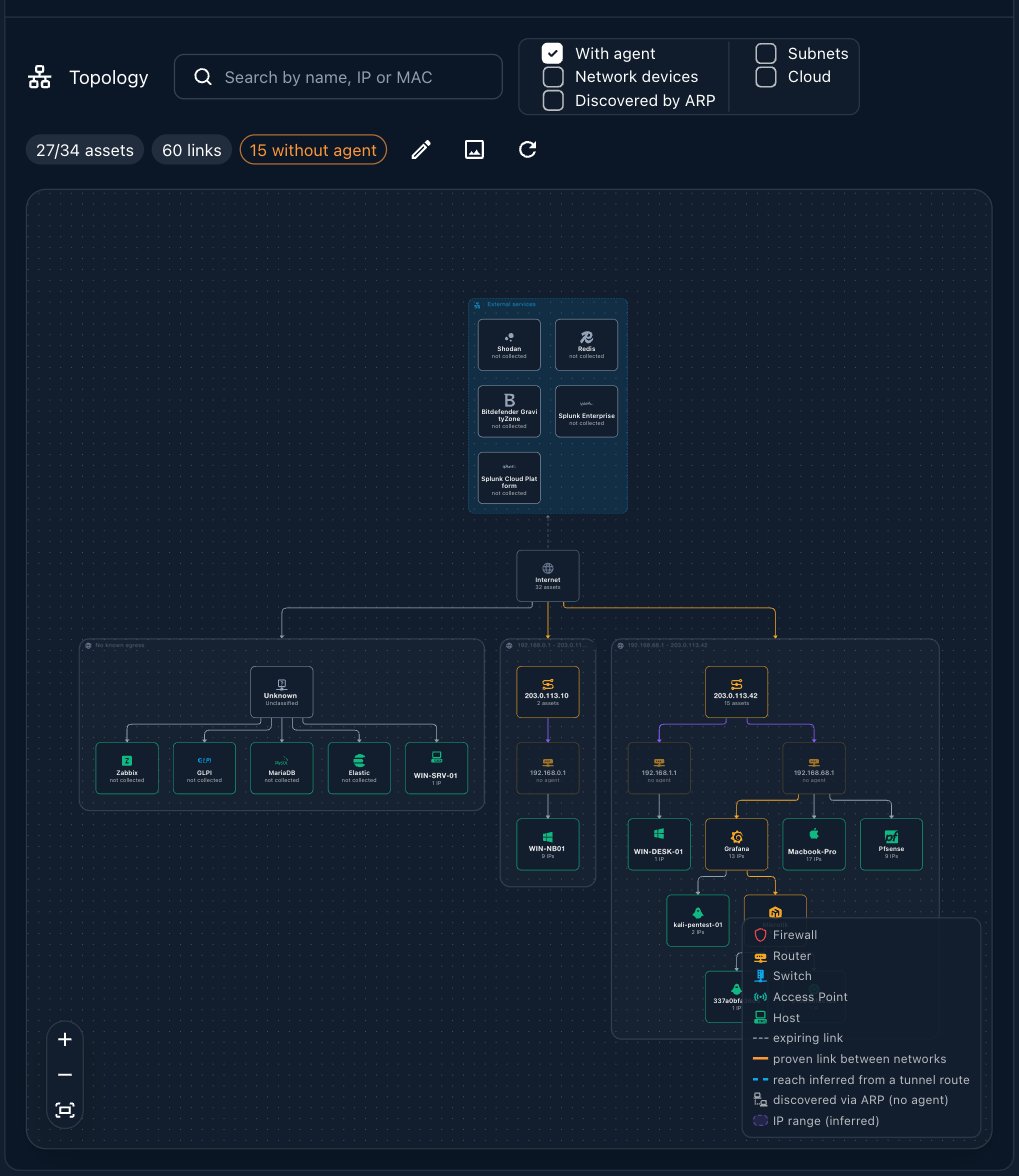
A target only contributes to the map when its Topology module is on. You
switch it per target, next to the Audit module — see
Frameworks & scanning.
How to Use Apolo
Ask in plain language, naming Apolo when you want the network view specifically:- “Apolo, which hosts share the same gateway or VLAN?”
- “What devices are on the network without a Myrmex agent?”
- “If this host were compromised, what else sits on its segment?”
Apolo vs. Brontes
Both know about your devices, from opposite directions:- Brontes knows what you have registered — the assets you onboarded, their state and their configuration.
- Apolo knows what is reachable — the segments, the paths between them, and the machines nobody registered.
Where to Go Next
Brontes
The platform and asset administrator.
Perseus
The specialist that acts on a host once you’ve found it.